Skip to content

Blog

Analysis of Sindarin API: a modular Moose use case

How is our API used? This is the question the Pharo debugging team came to me with. They needed to know if it is used as they intended to or if there are some improvements to do. To answer that question, we used some of Moose new browsers.

The Pharo debugging team works on Sindarin, an API that eases the expression and automation of debugging tasks. Sindarin is made of two layers:

  • The “technical” API is the minimal API needed to interact with a debugging kernel (the Pharo kernel here).
  • The “scripting” API is here to ease the writing of debugging scripts without having to manipulate low-level concepts.

"Sindarin API"

Now, that’s the theory. In reality, the debugging team realized that these two layers are not really respected: users bypass the scripting API to use technical methods and the debugging kernel methods directly. We used Moose to analyze Sindarin API usage, to help understand if, and how, it should be improved.

Moose has recently been upgraded and now offers more modularity. Users can analyze their model through new specialized browsers that allow users to navigate and visualize their model entities. Entities are propagated from one browser to the others, dynamically updating their contents.

Helping the debugging team was an opportunity to test some of these browsers under operating conditions.

Analysis of the interactions of the users scripts with Sindarin and with the debugging kernel

Section titled “Analysis of the interactions of the users scripts with Sindarin and with the debugging kernel”

To analyze Sindarin, we built a model constituted of 3 key elements:

  • Users debugging scripts: script methods gathered in 4 Classes (green in the figure above)
  • Sindarin: methods from the SindarinDebugger class (both APIs, yellow and blue in the figure)
  • Pharo debugging kernel (pink in the figure)

Our goal was to understand how the users’ scripts use Sindarin and if they interact directly with the debugging kernel.

We imported the model directly from Pharo, using the Model Root browser. This browser is the entry point to modular Moose. It shows the list of installed models and allows to import new ones from MSE files or from Pharo.

"Model Root Browser"

Once the model was imported, it was automatically propagated in modular Moose, to other browsers.

Querying the model to select key elements from the model

Section titled “Querying the model to select key elements from the model”

To explore the debugging scripts, Sindarin and the debugger kernel - and the interactions between them - we used the Query browser.

The purpose of this browser is to query a model or a group of entities. It can filter entities according to their type or the value of their properties. It can also use MooseQuery to navigate associations (inheritances, invocations, accesses, and references) and scopes (containment).

"Queriest Browser"

The left pane of the browser is a visualization of the queries that were made. On the image above, no queries were made yet. The left pane only shows the model on which queries will apply. The right pane of the browser shows the result of the selected query and the code used to build it.

We obtained the 3 elements relevant to our analysis (users scripts, Sindarin, and the debugger kernel) by combining simple queries:

  • A Type query (Classes) gave us all the classes in the model, then
  • a property query (name beginsWith: 'SindarinScript') gave us the 4 scripts classes.

The two images below show how this last query was constructed:

"Query Scripts - Step 1"

"Query Scripts - Step 2"

Queries to get Sindarin API, i.e. methods of the class SindarinDebugger:
Section titled “Queries to get Sindarin API, i.e. methods of the class SindarinDebugger:”
  • A type query (Classes), gave us all classes in the model, then
  • a property query (name = 'SindarinDebugger’), gave us the Sindarin API class.
  • finally, a scope query (scope down to methods) gave us all Sindarin methods, i.e. the API.
Queries to get methods from the debugging kernel:
Section titled “Queries to get methods from the debugging kernel:”

The image below shows the sequence of queries created to obtain methods from the Context class and the Debugger-Model package:

  • Two Type queries (Classes and Packages, green on right), gave us all classes and packages in the model, then
  • two property queries (name = 'Context' and name = 'Debbuger-Model', blue), gave us the Context class and the Debugger-Model package, then
  • we made the union (pink) of the class and package, and finally
  • a scope query (scope down to methods, turquoise, bottom right query) gave us the methods they contain.

"Kernel methods"

Saving queries combinations as custom queries

Section titled “Saving queries combinations as custom queries”

We saved these combinations of simple queries as custom queries, as shown in the image below:

  • SindarinScript classes are the 4 script classes.
  • SindarinDebugger methods are the Sindarin API, i.e. methods from SindarinDebugger class
  • Debugger Kernel methods are methods from the debugging kernel, that should not be called directly from the scripts.

"Saved queries"

How do scripts interact with Sindarin and the debugging kernel?

Section titled “How do scripts interact with Sindarin and the debugging kernel?”

We added a navigation query to obtain methods that were called in the script. We then narrowed this result by selecting methods from Sindarin or from the debugging kernel.

To find which methods are called in the users scripts, we queried outgoing invocations from the scripts classes. We obtained a group of 331 candidate methods whose signatures match messages sent in the scripts:

"Script outgoing"

The next step was to compare this group of candidates with the methods from Sindarin scripting API. We established with the debugging team that scripting methods should have "scripting" as comment. This convention allowed us to get them with a property query (blue query in the figure below).

We queried for the intersection between the scripting API and the group of candidates invoked from the users scripts (salmon query at the bottom left in the figure below). This gave us 26 methods that are called from the scripts, out of 45 in the Sindarin scripting API:

These 26 mehtods, result of the last query performed, are listed in the top right pane of the Query browser.

"API called in scripts"

Sindarin methods that are not used in the scripts

Section titled “Sindarin methods that are not used in the scripts”

It was important for the debugging team to know the other 19 scripting API methods that are not called from the scripts. We obtained them by querying the difference between Sindarin methods and the group of candidates (purple query at the bottom left in the figure below):

"API not called in scripts"

Again the 19 resulting methods are listed in the “Result” pane.

The debugging team now knows which methods from their scripting API have been useful for users and, most importantly, which methods have not.

Debugging kernel methods called from the scripts

Section titled “Debugging kernel methods called from the scripts”

We also compared the group of candidates invoked from the users scripts with the methods of the debugging kernel and obtained 15 methods. These methods are used directly in the users scripts without using Sindarin:

"Kernel in scripts"

Identifying the scripts that use the debugging kernel:

Section titled “Identifying the scripts that use the debugging kernel:”

Let’s get back to the fact that outgoing invocations gave us a group of candidates methods. When several methods share the same signature, we cannot know for certain which method is called.

For example: Sindarin defines #arguments, which is also defined in Context.

Sindarin defines:

arguments
^ self context arguments

that should be used as follows:

sindarin := SindarinDebugger new.
"some steps"
(sindarin arguments at: 1) doSomething.

We wanted to detect cases where the users did not use Sindarin, like in the following:

sindarin := SindarinDebugger new.
"some steps"
(sindarin context arguments at: 1) doSomething.

This is a simple example or wrong practice. In more complex cases, interacting directly with the kernel would force the user to write verbose scripts and increase the risk of bugs. Why not benefit from a tested API when you can ?

To detect these cases, we used a convention of the users scripts: each time a call to Sindarin API is made, the receiver is a variable named sindarin. This means that invocations which receiver is not sindarin are probably cases where the user bypassed Sindarin API, calling the debugging kernel directly.

We inspected the 15 debugging kernel methods that may be used directly in the scripts and selected the ones that are sent from the scripts to a receiver other than sindarin. This was done in Pharo (not the Query browser), using MooseQuery:

self select: [ :method |
method incomingInvocations anySatisfy: [ :invocation |
(invocation sender parentType name beginsWith: 'SindarinScript')
and: [ invocation receiver isNil
or: [ invocation receiver name ~= 'sindarin' ] ] ] ]

We narrowed it down to 11 methods of the debugging kernel that are called from the scripts:

"Kernel called in scripts"

We then collected the scripts where these methods are called:

self flatCollectAsSet: [ :method |
method incomingInvocations
select: [ :invocation |
(invocation sender parentType name beginsWith: 'SindarinScript')
and: [ invocation receiver isNil
or: [ invocation receiver name ~= 'sindarin' ] ] ]
thenCollect: #sender ]

We obtain 15 user script methods that need to be investigated manually. Moose cannot determine which object will receive a message when the script is executed. The debugging team will analyze in the scripts the statements where the probable kernel methods are invoked. They will run the debugging scripts to identify at runtime which objects are the receivers.

Exploring these 15 scripts will help the debugging team to understand whether:

  • Users did not use Sindarin correctly: they interacted directly with the debugging Kernel, even though Sindarin methods are available,
  • Sindarin API is incomplete: users had no choice but to interact with the debugging kernel because Sindarin does not provide the necessary methods,
  • There are other reasons why the API is not used correctly?

"Scripts calling kernel"

With this experiment, we were able to provide valuable information to the debugging team. In return, we got suggestions of improvements to be implemented in modular Moose tools.

To know how many times a method is called, we need the number of invocations of this method. That is querying the size of a query result. The query browser does not allow it yet, and it should.

To get the 15 users scripts that need to be explored, we had to inspect a group of methods and run a selection manually (Pharo code). This should be possible directly in the queries browser: users should be able to build a query that executes a query script.

This experiment will help Pharo debugging team to improve Sindarin. They will be able to make it more complete and documented, so users continue to develop debugging scripts.

In the meantime, we will improve modular Moose to widen the queries possibilities. Then, we will challenge these new features: we will use them to analyze the upgraded Sindarin API to document its evolution.

Don't like Windows? Use WSL!

Recently, I’ve been using a Moose utility (MooseEasyUtility) to ease the creation and loading of a Moose Model. In turn, this utility uses the LibC to send various commands to the operating system for example to call the VerveineJ parser. However, when using this library, I encountered a problem on my Windows machine. The problem was caused by an encoding issue between the Java Parser (VerveineJ) and the file reader in Pharo. This is Windows specific as there was no issue when running my program on a Linux-based machine.

Sometimes you have to use the Windows OS like me, or you want to build an interoperable application that runs on multiple applications. Your Pharo program may eventually run on a Windows or Linux-based OS; however, you may not be familiar with Windows. Luckily, Microsoft has finally opened up its system to introduce the Windows Subsystem Linux (WSL).

WSL is a compatibility layer for running Linux binary executables (in ELF format) natively on Windows 10. Furthermore, in 2019, Microsoft introduced WSL 2, which included important changes such as a real Linux kernel, through a subset of Hyper-V features. The important thing to remember is that it allows us to use bash commands on Windows 10.

There are two ways to install WSL on your machine. The simplified installation requires that you join the Windows Insider Program and run the command wsl --install. The manual installation is a bit more complicated but the steps are detailed on docs-microsoft.

Once installed you may access WSL by either launching WSL through the search bar or by running your favorite terminal and using the command wsl.

"search"

You can also type wsl in your terminal to access the WSL directly.

"search"

The next step after installing WSL on your machine is to launch your favorite image of Pharo. From there you can use the class LibC to run some commands:

LibC resultOfCommand: 'ls'.
LibC resultOfCommand: 'wsl ls'.

As you will see, when the first command is sent, the terminal returns an error as Windows does not recognize the ls command. However, when you execute ls with the wsl command, it can now successfully display the list of files in the current directory.

Let’s come back to our problem with Moose-Easy. Moose-Easy is a library to facilitate access to Moose, e.g. to generate MSE files from a source code. Originally, I wanted to use Moose-Easy to parse and generate a model of the Java project I was working on. In my project, I passed the path to the source code, the parser, and any project dependencies I wanted to analyze.

generate
"Generates this model importer's model from its origin into its configured model path, using its parser"
MooseEasyUtility
createJavaMSEOn: self originSrcPath asFileReference asPath
using: self parser path asFileReference pathString
named: self modelPath asFileReference pathString
withDependencies: self dependenciesFolder

This method uses MooseEasyUtility to generate the model as a MSE file which would be later imported. Then, the import method from my project imports the MSE as a Moose Model.

import
"Imports this model importer's model from its configured model path"
self modelPath asFileReference readStreamDo: [ :stream |
model := MooseModel importFromMSEStream: stream.
model
rootFolder: self originPath;
install.
^ model
]

An important feature of the Moose Model is the ability to access/visualize the source code of an entity. To enable this, during the generation of the MSE, the parser (here VerveineJ) creates a SourceAnchor which writes the start position and end position of the entity within a specific file. However, when manipulating the model, I noticed that the sourceAnchors’ start/end positions were shifted. This resulted in accessing the wrong portions of the source code for each entity. After investigating this shift, it became clear it was due to an encoding issue with the carriage return. When the parser accessed the file it read it the carriage returns differently than when it was being accessed by the Moose library. To fix this issue without modifying the parser, I used WSL commands to run my parser. More precisely, I replaced the direct call to the parser executable with a call to wsl to run the parser. The following instruction of MooseEasyUtility was changed from:

command := 'cd "' , revPath asFileReference pathString , '" && "'
, pathToJavaToFamixCommand , '" ' , verveineJOptions , ' > "'
, javaToFamixOutput fullName , '"' , ' 2> "'
, javaToFamixErrors fullName , '"'.
result := LibC runCommand: command.

to:

command := 'cd "' , revPath asFileReference pathString , '" && wsl"'
, pathToJavaToFamixCommand , '" ' , verveineJOptions , ' > "'
, javaToFamixOutput fullName , '"' , ' 2> "'
, javaToFamixErrors fullName , '"'.
result := LibC runCommand: command.

Notice that instead of calling the JavaToFamixCommand (i.e. VerveineJ) directly, it is now called through wsl (end of first line). This allowed me to generate a MSE file that contained the correct start/end positions.

Additionaly, it is important to remember that if an absolute path is passed to wsl, it must be formatted according to Linux and WSL conventions. On Windows, the path to a file may look like this C:\Users\Pascal.ZARAGOZA\eclipse-workspace. While the WSL absolute path will look like this /mnt/c/Users/Pascal.ZARAGOZA/eclipse-workspace. This is why I recommend to use relative paths whenever possible when using a mix of WSL and Windows commands.

If you are interested in analyzing your java project with Moose 8, there is a detailed blog post by Christopher Fuhrman on the subject. It covers the whole process of using MooseEasyUtility to clone, parse, and load the corresponding model of a java project. It also demonstrates how to both visualize and analyze the moose model.

Model your Fame/Famix Meta-model using Graphical Editors

Building metamodels for Fame and Famix is currently done through a generator. The generator consists in various special methods that need to be implemented, eg, one that will create all metaclasses, another that will create all attributes for each metaclass,… The metamodel’s artifact are created programmatically using pure Smalltalk syntax extended with specific operators to easily express relationships and cardinalities (<>-, *-*, <>-*, …). For more details, please refer to the article about “Coaster”, written by Benoit Verhaeghe.

In this blogpost, I will show you how to use existing metamodeling diagraming tools to design your metamodel, and then to use the designed meta-model to generate your meta-model code for Fame in Moose. In another blogpost, I will show you how to use this same generator to use graphical modeling tools to generate code for Famix.

The generator concept provided for Fame/Famix in Moose is practical, but can be intimidating in the first place. Moreover, discovering an existing metamodel, or modifying an existing one can be hard as it requires to switch between various methods. Some projects exist, as PlantUMLPharoGizmo, to automatically build a graphical representation of an existing metamodel. This approach considers the code of the meta-model as the main artifact and builds the diagram out of it.

In this post, we will consider the opposite: putting the diagram as the main artifact, then using the diagram as the basis for generating the code of the Fame/Famix generator. Despite its possible complexity to describe a generator for a full huge metamodel, the syntax for building the generator is easy to deal with and easy to generate. The general process is sketched in Figure 1. From the graphical modeling editor, the produced meta-model is given to a dedicated code generator that will produce the Fame/Famix Generator.

"General Flow, from Graphical Model to Fame/Famix Generator Code"

Here is an interesting fact. Building a graphical modeling editor from scratch is hard. It can look easy in the first place, basically, it’s only links and boxes, but it turns out that creating an editor that allows you to create a model, enforcings rules defined by a metamodel, is a complex task (without speaking about all graphical rules that need to be injected in the editor). Consequently, we will reuse existing graphical modeling tools that already allow model metamodels.

Currently, there is no pure metamodeling editors for Pharo/Moose. The only existing project is the OpenPonk project which gives the ability to create UML models with XMI support, but UML proposes a lot of concepts that could lead to wrong design in the end (using wrong concepts). On the other end, on the MDE community, Ecore is an implementation of the EMOF and various desktop or web-based graphical editors exists. Following then the flow we described earlier, the Graphical Modeling Editor will be one of the various graphical Ecore modeling editor. The designed meta-model will be serialized in XMI (default output for those kind of editors), given to a code generator that will produce the Fame/Famix code generator. The output of the code generator will follow the tonel format so it can be easily imported by Moose/Pharo.

As Fame, Ecore is a meta-meta-model that is used to create meta-models. Various graphical tools exist for it, so we have a little bit of choice. The entry point of our chain is an Ecore meta-model in a XMI format and the destination a Smalltalk class in a tonel format, but, the generated class will describe a generator for a Fame meta-model, not an Ecore one. Consequently, we need to align Ecore concepts with Fame concepts. This blogpost does not go into details about the full alignment between Ecore and Fame, but gives some keys that are used.

Fame proposes two main concepts: FM3Class (metaclasses) and FM3Traits (traits). On the contrary, Ecore only provides the concept of EClass to represent metaclasses, which is aligned with the metaclass concept of Fame. Also, Ecore let users mark a metaclass as interface, which is a concept that comes close to the trait concept in Fame. Thus, the alignment that we will keep here is:

  • EClass -> FM3Class (metaclasses)
  • EClass interface -> FM3Traits (traits)

Attributes in Fame are modeled by the concept of FM3Property. Attributes represent a property of a metaclass/trait and are usually bound to objects outside of the Fame “ecosystem” (as String that comes from Pharo for example). The same concept can be found in Ecore with the EAttribute concept. On the contrary of attributes in Fame, EAttribute in Ecore can own default values (and a set of other attributes that we will not consider here). Consequently, we can directly align simple EAttribute to Fame attribute, ignoring the default value if one is set. In this condition, the alignment is:

  • EAttribute -> FM3Property

References in Fame are also modeled by the concept of FM3Property. They can own a set of properties and can be marked as “containement”, and they own a cardinality. References represent relationships between metaclasses. In Ecore, the EReference concept is the equivalent to FM3Property, that’s then the one we use to model relationships. The alignment is:

  • EReferences -> FM3Property

Ecore proposes more concepts that are not directly aligned with Fame, e.g.: EEnumeration, EGenericType,… Thus, those concepts are not handled by the generator.

Now that we know how we will represent Fame concepts with Ecore, we can use a graphical modeling tool to design Ecore meta-model to design Fame metamodels.

For this blogpost, three tools have been tested, two web-based one and a desktop one:

They all work well and have their pros and cons. As example/illustration of this section I used GenMyModel (I worked there for some years, I know well the tool), but the design process is the same whatever the used tool.

When you design your meta-model for Fame using a graphical Ecore editor, you just focus on the concepts you want to represent. The meta-model we are going to design is the one presented by Benoit in his article about “Coaster”.

The designed Ecore meta-model can be found at this address and it looks like this:

"Coaster Meta-model in Ecore"

In addition, we also set two specific properties of the base EPackage: nsURI and nsPrefix. While the nsURI is more internal/maintenance related (it can be used to propose a unique identifier towards this version of the metamodel), nsPrefix is really important as it will set the prefix that will be used later for the generation of the generator. I thus set the two values to:

  • nsURI = https://coaster/1.0
  • nsPrefix = Ct

With this, we are ready to generate the code of our generator.

The code generator is coded in Python using the PyEcore library to be able to decode/resolve Ecore files. The generator goes across the full meta-model at least once to perform model validation, tries to correct some issues (like spaces at the beginning or end or names), and raises an error if it cannot generate the code for some reasons. Once the meta-model is validated, it generates the Fame generator code using Mako, a template engine.

The generator installation is pretty simple if you have the right tools. You can find the code on GitHub at this address. You can install all the dependencies manually on your system, but the proper way of dealing with the dependencies would be to use a virtual environment (a virtualenv). Virtualenvs creation and activation can be somehow complicated if you are not used to it. To ease this step, the repository contains a Pipfile to be used with pipenv. If you don’t have pipenv installed on your machine, feel free to install it, it helps you creating virtualenvs from Pipfile with all the required dependencies and ease also their activation. In our case, with pipenv, the installation is pretty forward:

Terminal window
$ git clone https://github.com/aranega/famegenerator.git
$ cd famegenerator
$ pipenv install

And you’re good to go, pipenv creates a virtualenv and installs all the dependencies isolated in your virtualenv. Now, each time you want to use the created virtualenv, you can just enter in the directory where the code of the generator is installed and just activate the virtualenv:

Terminal window
$ pipenv shell

If you did your meta-model online, there are two options for you. Either you can download the .ecore on your machine and generate the code from there, or you can give to the generator a valid URL where the XMI of your ecore meta-model is located. Whatever option you’ll choose, you can generate the code of your generator this way:

Terminal window
$ python famegen.py <URL_OR_FILE> -o mymeta.class.st

This will generate the code of your generator in a tonel format in the file mymeta.class.st. If you don’t use the option -o, the generated code is displayed on standard output.

Here is the line used to generate the generator of the Coaster meta-model:

Terminal window
$ python famegen.py https://app.genmymodel.com/api/projects/_vgiYcHuVEeuCM8KqVoRWiA/xmi -o /tmp/coaster.class.st

Here is the content of the file:

Class {
#name : #CoasterGenerator,
#superclass : #FamixMetamodelGenerator,
#instVars : [
'shape',
'coaster',
'creator',
'country',
'round',
'square',
'oval',
'brewery'
],
#category : #Coaster
}
{ #category : #accessing }
CoasterGenerator class >> packageName [
^ 'Coaster'
]
{ #category : #accessing }
CoasterGenerator class >> prefix [
^ 'Ct'
]
{ #category : #definition }
CoasterGenerator >> defineClasses [
super defineClasses.
shape := builder newClassNamed: #Shape.
coaster := builder newClassNamed: #Coaster.
creator := builder newClassNamed: #Creator.
country := builder newClassNamed: #Country.
round := builder newClassNamed: #Round.
square := builder newClassNamed: #Square.
oval := builder newClassNamed: #Oval.
brewery := builder newClassNamed: #Brewery.
]
{ #category : #definition }
CoasterGenerator >> defineHierarchy [
super defineHierarchy.
round --|> shape.
square --|> shape.
oval --|> shape.
brewery --|> creator.
]
{ #category : #definition }
CoasterGenerator >> defineProperties [
super defineProperties.
coaster property: #image type: #String.
coaster property: #number type: #Number.
coaster property: #owned type: #Boolean.
creator property: #name type: #String.
country property: #name type: #String.
]
{ #category : #definition }
CoasterGenerator >> defineRelations [
super defineRelations.
(shape property: #coasters) *-* (coaster property: #shapes).
(coaster property: #country) *-<> (country property: #coasters).
(coaster property: #creator) *-<> (creator property: #coasters).
]

We find back all the information we put in our design, relationships, names, metaclasses, … This file can be directly imported in Moose and used to generate the meta-model code:

(TonelParser parseString: ('/tmp/coaster.class.st' asFileReference contents )) do: #load. "Load the generated generator"
CoasterGenerator generate. "Generate the meta-model code"

That’s all folks for this post. Next time, we will discuss about how to generate a dedicated meta-model for Famix instead of only Fame. The exact same code generator will be used, but this time, we will have to deal with the desktop Ecore diagram tool for technical reasons.

Happy metamodeling!

Coasters collection

I’m a coasters collector. I’m not a huge collector but I want to inventory them in one place. For sure, I can create a PostgreSQL database. But, at the same time, it appears that I can also design my collection using Moose.

So, you’re going to use a complete system analysis software to manage your coasters collection?

Exactly! And why? Because I think it’s simpler.

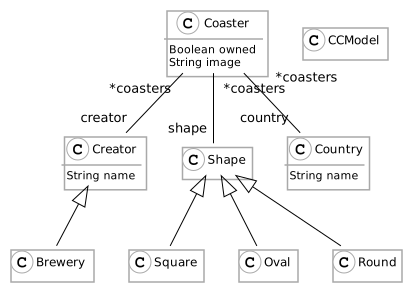
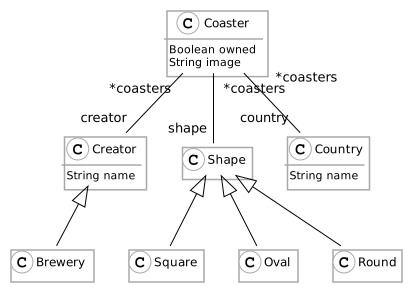
As for every software system, the first step is to design the model. In my case, I want to represent a collection of coasters. Let’s say a coaster is an entity. It can belong to a brewery or not (for example event coasters). A coaster also has a form. It can be round, squared, oval, or others. A Coaster can also be specific to a country. Because it is a collection, I can register coaster I own and other I do not. Finally, each coaster can have an associated image.

From this description of the problem, I designed my UML schema:

"coasters UML"

The most complicated part is done. We just need to implement the meta-model in Moose now 😄.

First of all, we’ll need a Moose 8 image. You can find everything you need to install Moose in the moose-wiki.

Ok! Let’s create a generator that will generate for us the meta-model. We only need to describe the meta-model in the generator. We will name this generator CoasterCollectorMetamodelGenerator.

FamixMetamodelGenerator subclass: #CoasterCollectorMetamodelGenerator
slots: { }
classVariables: { }
package: 'CoasterCollector-Model-Generator'

The generator needs to define two methods class side for the configuration:

  • #packageName defines where the meta-model will be generated
  • #prefix defines the prefix of each class when they are generated.

We used for #packageName:

CoasterCollectorMetamodelGenerator class >>#packageName
^ #'CoasterCollector-Model'

We used for #prefix:

CoasterCollectorMetamodelGenerator class >>#prefix
^ #'CC'

Now, we have to define the entities, their properties, and their relations.

A meta-model is composed of entities. In our case, it corresponds to the entities identified in the UML. We use the method #defineClasses to define the entities of our meta-model.

CoasterCollectorMetamodelGenerator>>#defineClasses
super defineClasses.
coaster := builder newClassNamed: #Coaster.
country := builder newClassNamed: #Country.
shape := builder newClassNamed: #Shape.
round := builder newClassNamed: #Round.
square := builder newClassNamed: #Square.
oval := builder newClassNamed: #Oval.
creator := builder newClassNamed: #Creator.
brewery := builder newClassNamed: #Brewery

We also need to define the hierarchy of those entities:

CoasterCollectorMetamodelGenerator>>#defineHierarchy
super defineHierarchy.
brewery --|> creator.
oval --|> shape.
square --|> shape.
round --|> shape

As we have defined the classes, we defined the properties of the entities using the #defineProperties method.

defineProperties
super defineProperties.
creator property: #name type: #String.
country property: #name type: #String.
coaster property: #image type: #String.
coaster property: #owned type: #Boolean

In this example, we did not use Trait already created in Moose. However, it is possible to use the Trait TNamedEntity to define that countries and creators have a name instead of using properties.

Finally, we defined the relations between our entities:

defineRelations
super defineRelations.
(coaster property: #shape) *- (shape property: #coasters).
(coaster property: #country) *- (country property: #coasters).
(coaster property: #creator) *- (creator property: #coasters)

Once everything is defined, we only need to use the generator to build our meta-model.

CoasterCollectorMetamodelGenerator generate

The generation creates a new package with our entities. It also generates a class named Model used to create an instance of our meta-model.

I have created my meta-model. Now I need to fill my collection. First of all, I will create a collection of coasters. To do so, I instantiate a model with: model := CCModel new. And now I can add the entities of my real collection in my model and I can explore it in Moose.

For example, to add a new brewery I execute: model add: (CCBrewery new name: 'Badetitou'; yourself).

The code is available on github.

Once I have created the collection, I can save it using the Moose export format (currently JSON and mse). To do so, I execute the following snippet:

'/my/collection/model.json' asFileReference ensureCreateFile
writeStreamDo: [ :stream | model exportToJSONStream: stream ]

Then I can select where I want to export my model.

To import it back into an image, I use the following code

'/my/collection/model.json' asFileReference
readStreamDo: [ :stream | model := CCModel importFromJSONStream: stream ]

Micro-Visitors for Parsing Programming Languages

For Moose, I had to design a number of parsers for various languages (Java, Ada, C/C++, PowerBuilder). If you have already done that, you will know that the Visitor pattern is a faithful ally. To help me in this, I came with the concept of “micro visitor” allowing to modularize visitors.

Parsing source code starts with a grammar of the programming language and an actual parser that creates an Abstract syntax Tree (AST) of the program.

For many programming languages, the AST can contain tens of different nodes. The way to master this complexity is to use visitors. A visitor is a class with one method (traditionaly visitXYZ(XYZ node)) for each possible type of node in the AST. Each method treats the current node and delegates to other methods treating the nodes below it.

For a parser like VerveineJ (Java to MSE importer) the visitor class reached 2000 lines of code and became difficult to maintain as there are also interactions between visiting methods because the treatment of a node down in the AST may depend on what are its parent nodes. For example, in Java, ThisExpression node may be found in different situations:

  • Return the instance running the current method: this.attribute
  • Return the enclosing object of the current instance: AClass.this
  • Invoke current class constructor: this(...)

Therefore the treatment in visitThisExpression( ThisExpression node) may depend on which method called it. This makes it more complex to develop and maintain all the “visitXYZ” methods.

On the other hand, a visitor typically has a small state:

  • the name of the file being parsed;
  • a context stack of the visit (eg visiting a method, inside a class, inside a file);
  • a model of the result being built by the visitor (eg a Moose model).

As a result, I came up with the notion of micro-visitors specialized for a single task. For example, for VerveineJ, I have 10 (concrete) micro-visitors, 4 to create entities and 6 to create dependencies between them:

  • VisitorPackageDef, creating Famix packages;
  • VisitorClassMethodDef, creating Famix classes and methods;
  • VisitorVarsDef, creating Famix attribute, parameter, local variable definition;
  • VisitorComments, creating comments in all Famix entities;
  • VisitorInheritanceRef, creating inheritances between classes
  • VisitorTypeRefRef, creating reference to declared types;
  • VisitorAccessRef, creating accesses to variables;
  • VisitorInvocRef, creating invocation dependencies between methods;
  • VisitorAnnotationRef, handling annotations on entities;
  • VisitorExceptionRef, handling declared/catched/thrown exceptions.

The resulting visitors are much smaller (around 600 lines of code for the three more complex: VisitorInvocRef, VisitorClassMethodDef, VisitorAccessRef ; less than 150 lines of code for VisitorPackageDef and VisitorExceptionRef) and thus easier to define and maintain. Also, because the visitor is specialized, there are less dependencies between the methods: VisitorInvocRef only treats ThisExpression when it is a constructor invocation.

The overhead on the execution is small as each visitor is specialized and does not need to go through all the AST (eg a visitor for function declaration in C would not have to visit the body of these functions since they cannot contain other function declarations).

Micro-visitors can be used independantly one of the other (in sequence) as in VerveineJ where each visitor is called one after the other (by the FamixRequestor class) to visit the full AST. The “orchestrator” object owns the state and pass it to each visitor in turn.

Micro-visitors can also call one another (in delegation). For example for PowerBuilder, there is one main visitor (PowerBuilder-Parser-Visitor.PWBCompilationUnitVisitor, visiting the AST for a source file) and 7 (concrete) micro-visitors:

  • PWBTypeDeclarationVisitor, visiting type declarations;
  • PWBBehaviouralDeclarationVisitor, visiting function/routine definitions;
  • PWBVariableDeclarationVisitor, visiting declarations of all kind of variables;
  • PWBTypeReferenceToIdentifierVisitor, visiting references to type names (for example in variable declarations);
  • PWBStatementsVisitor, visiting statements in the body of behaviourals;
  • PWBExpressionsVisitor, visiting expressions in statements;
  • PWBBehaviouralInvocationVisitor, visiting the invocation of behavioural in expressions.

In this case, the main visitor (PWBCompilationUnitVisitor) owns the state and its auxiliary visitors get this state from their respective parent visitor:

  • PWBCompilationUnitVisitor spawns a PWBBehaviouralDeclarationVisitor when it encounters a function definition, this one spawns a PWBStatementsVisitor to visit the body of the function, PWBStatementsVisitor spawns a PWBExpressionsVisitor to visit expressions found in the statements.
  • if the PWBExpressionsVisitor needs to access the context stack, it asks to its parent PWBStatementsVisitor, that asks to its parent PWBBehaviouralDeclarationVisitor, that asks to the PWBCompilationUnitVisitor.